

 Verified

What is Alter? How It Works, Use Cases & Alternatives Alter is a modern AI productivity assistant built mainly for […]
AI Categories: Personal Assistant,
AI Tags: #personal assistant
What is Alter? How It Works, Use Cases & Alternatives
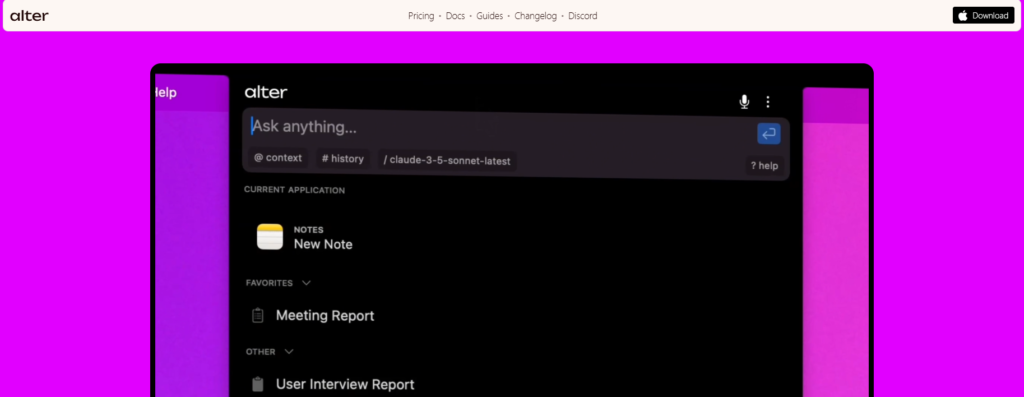
Alter is a modern AI productivity assistant built mainly for macOS users. It works across apps and helps you complete daily tasks faster using voice commands and smart automation. It is designed to reduce manual work and improve workflow speed.
In 2026, productivity tools are shifting toward voice-first and system-level AI. Alter fits this trend by integrating directly into the macOS environment. It sits in the macOS notch and connects with your apps to help you work without switching tools.
Professionals like developers, consultants, and creatives can benefit from Alter. It is especially useful for users who manage meetings, emails, and documents every day.
What is Alter?
Alter is an AI productivity assistant that works inside macOS and connects with all your applications. It helps users complete tasks faster using AI automation and voice control.
The main problem it solves is workflow fragmentation. Many users switch between apps like email, notes, calendars, and documents. Alter brings these actions into one system. Its key purpose is to make daily computer tasks faster, smarter, and more automated while keeping everything secure and private on macOS.
How Does Alter Work?
Core Technology Behind Alter
Alter uses AI models combined with macOS-level integration. It runs as a system assistant and connects with multiple applications. It supports over 40 AI models in its Pro plan, giving flexible AI responses.
How It Processes User Input
Users can give input through voice commands or text. Alter listens to commands like “summarize meeting” or “write email reply” and understands the task using natural language processing.
How It Generates Output
After understanding the request, Alter performs actions across apps. It may generate text, summarize content, or trigger automation workflows. Results appear instantly inside connected applications.
What Can You Do with Alter?
Alter is designed for real productivity tasks. It helps users:
- Write and reply to emails quickly
- Summarize meetings automatically
- Create documents using voice commands
- Run custom automation actions
- Manage daily workflow across apps
For example, a consultant can ask Alter to summarize a client meeting and instantly get key points without manual notes.
How Are People Using Alter?
Different professionals use Alter in practical ways:
- Mac power users use it to automate daily tasks and speed up workflows
- Legal professionals use it for meeting summaries and document handling
- Creative professionals use it to manage ideas and content production
- Consultants use it for quick research and reporting
- Healthcare staff use it for non-desk administrative tasks
In real life, a lawyer might use Alter to quickly summarize a long meeting recording into key legal points.
How to Use Alter?
Step-by-Step Guide
- Install Alter on macOS
- Connect it with your preferred apps
- Set up voice or text input
- Choose or create automation actions
- Start using commands like summaries or email drafting
Tips for Beginners
- Start with simple commands first
- Use built-in actions before creating custom ones
- Learn voice commands for faster use
Common Mistakes to Avoid
- Trying advanced automation too early
- Not exploring built-in 80+ actions
- Ignoring setup customization options
How to Access Alter?
Alter is currently available for macOS users only. It can be accessed through:
- macOS desktop application
- Voice-first interface integrated into system
- API support for advanced users
There is no mobile or Windows version, as it is built specifically for Apple ecosystem users.
Key Features of Alter
- AI Instant Actions – 80+ built-in commands for fast tasks
- Voice-First Computing – control apps using voice input
- macOS Notch Integration – seamless system-level experience
- Cross-App Support – works across multiple applications
- Meeting Summaries – auto-generates notes from meetings
- Custom Actions – build your own workflows
- Local Encryption – protects user data securely
- Offline Mode – works without internet in some cases
- Multi-Model Support – access to 40+ AI models in Pro plan
Alter Pricing
Free Plan
- $0 per month
- Includes core features
- Supports custom API keys
- Offline/local model support
- No credit card required
Paid Plans
- Pro Plan: $29/month
Includes unlimited AI model access and advanced features - Lifetime Plan: $720 one-time
Includes full access and 1-on-1 sessions
Is Alter Worth It?
For macOS power users, Alter is worth it because it combines automation, voice control, and privacy in one tool. The free plan is also strong for basic users.
Rating Summary
- Ease of Use: 4.2/5
- Features: 4.8/5
- Pricing: 4.4/5
- Overall: 4.6/5
Benefits of Alter
- Saves time on daily tasks
- Improves productivity with automation
- Strong privacy with local encryption
- Works across multiple apps
- Supports voice-based control
- Highly customizable workflows
Limitations of Alter
- Only available on macOS
- Setup can be complex for beginners
- Advanced features require learning time
- Not suitable for Windows or mobile users
How Accurate is Alter?
Alter performs well in productivity tasks like summarization, writing, and automation. Since it uses multiple AI models, output quality can vary depending on the selected model.
Overall, it is reliable for daily workflow tasks and office productivity use. It is less suitable for highly technical or research-heavy tasks without model tuning.
Best Alternatives to Alter
- WatchNow AI – Focuses on AI-powered content and media assistance
- Casper AI – Browser-based AI assistant for research and summaries
- Microsoft Bing – General AI search and productivity assistant
- timeOS – Meeting-focused AI tool for scheduling and notes
Each alternative focuses on a different workflow area, while Alter focuses on macOS system-level productivity.
Latest Updates
In 2026, tools like Alter are moving toward deeper OS-level integration. The trend is toward voice-first computing and offline AI support. Alter’s key improvements include:
- Better macOS integration with smoother performance
- Expanded AI model support
- Improved offline processing
- More customizable automation workflows
FAQs
Is Alter free?
Yes, Alter has a free plan with core features and API support.
Is it safe to use?
Yes, it uses local encryption and privacy-focused design for security.
Who should use it?
Mac users, professionals, and anyone who wants faster workflow automation.
What makes it different?
Its deep macOS integration, voice-first design, and privacy-focused local processing make it unique.
Final Note
Alter is a powerful macOS AI assistant designed for productivity, automation, and privacy. It stands out because it works directly inside your system and helps you complete tasks faster with voice and AI actions.
Alter Reviews
No reviews yet. Be the first to comment!
Best Alter Alternatives AI

What is Promptless? How It Works, Use Cases & Alternatives In modern…

What is Tana? How It Works, Use Cases & Alternatives In 2026,…

What is Notebook AI? How It Works, Use Cases & Alternatives In…

What is Hyprnote? How It Works, Use Cases & Alternatives In 2026,…

What is Cake Resume Checker? How It Works, Use Cases & Alternatives …

What is Syft? How It Works, Use Cases & Alternatives The internet…

What is LiftmyCV? How It Works, Use Cases & Alternatives Job searching…

What is Integrity? How It Works, Use Cases & Alternatives Integrity is…
Leave a Reply