

 Verified

What is Fluent? How It Works, Use Cases & Alternatives Fluent is becoming an important tool in the modern data […]
AI Categories: AI Chatbots, Research, SQL,
AI Tags: #ai chatbots #research #sql
What is Fluent? How It Works, Use Cases & Alternatives
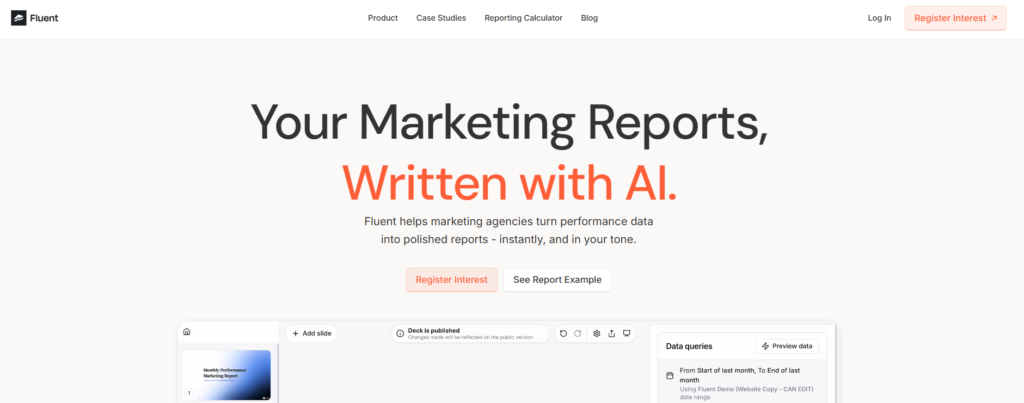
Fluent is becoming an important tool in the modern data world. In 2026, businesses want fast answers from data without writing complex queries. That is exactly where Fluent helps. It allows users to ask questions in simple language and get instant insights.
This tool matters because data is growing fast, and teams need quicker decisions. Traditional BI tools often require technical skills, which slows things down. Fluent removes that barrier.
It is mainly useful for business analysts, managers, executives, and even non-technical users. Anyone who wants quick data insights without coding can benefit from Fluent.
What is Fluent?
Fluent is an AI-powered data analytics tool designed to simplify how users interact with data. It uses natural language processing (NLP) so users can ask questions like “What were last month’s sales?” and get instant answers.
It solves a major problem in data analysis: dependency on SQL or technical dashboards. Most companies struggle because only data experts can extract insights. Fluent changes that by making data conversation-based.
The main purpose of Fluent is to democratize data access. It helps teams make faster decisions by removing technical barriers and improving data understanding across departments.
How Does Fluent Work?
Core Technology Behind Fluent
Fluent is built on Natural Language Processing (NLP) and machine learning models. These technologies help it understand human questions and convert them into data queries. It connects with data warehouses and business systems to fetch real-time data. It also uses secure cloud infrastructure for processing.
How It Processes User Input
When a user types a question, Fluent first interprets the intent. Then it identifies key metrics, filters, and time ranges.
For example: If you ask “Show revenue growth in 2025,” Fluent understands:
- Metric: Revenue
- Time period: 2025
- Action: Growth analysis
How It Generates Output
After processing, Fluent converts the query into backend data requests. It then pulls data from connected sources and presents results in charts, tables, or summaries. This makes it feel like chatting with a data expert instead of using a complex dashboard.
What Can You Do with Fluent?
With Fluent, users can perform many data tasks without technical skills. You can:
- Ask business questions in natural language
- Generate instant reports and dashboards
- Analyze sales, marketing, or finance data
- Track performance trends in real time
- Share insights with teams instantly
For example, a marketing manager can ask: “Which campaign performed best last quarter?” Fluent will instantly show results without manual report building.
How Are People Using Fluent?
Different industries use Fluent in practical ways:
- Business analysts use it to speed up data reporting
- Executives rely on it for fast decision-making
- Project managers track KPIs and deadlines
- Data scientists use it for quick exploration before deep analysis
- Non-profits measure impact and performance
- Academics analyze research datasets
For example, a retail company can use Fluent to track daily sales performance across multiple stores without waiting for manual reports.
How to Use Fluent?
Step-by-Step Guide
Using Fluent is simple:
- Sign in to the Fluent platform
- Connect your data sources (like databases or cloud storage)
- Open the chat interface
- Type your question in plain English
- Get instant insights and visual results
Tips for Beginners
- Ask clear and specific questions
- Use time frames like “last month” or “2025”
- Start with simple queries before advanced analysis
Common Mistakes to Avoid
- Asking very vague questions
- Not connecting proper data sources
- Expecting highly complex analysis in one query
How to Access Fluent?
Fluent is mainly a cloud-based platform. It can be accessed through:
- Web browsers (main platform)
- Business dashboards
- API integrations for enterprises
- Slack and Microsoft Teams integrations
It is designed for organizations, so it is not usually available as a simple mobile app for personal use.
Key Features of Fluent
Fluent offers powerful features for modern teams:
- Natural Language Processing (NLP): Ask questions in simple language
- Real-time collaboration: Teams can work on shared insights
- Slack & Teams integration: Get answers inside communication tools
- Enterprise-grade security: Strong encryption and authentication
- Custom data governance: Control data access and usage rules
- Data integration: Connects with warehouses and databases
- File compatibility: Supports multiple formats
- Encrypted storage: Secure saving of query results
These features make Fluent suitable for both small teams and large enterprises.
Fluent Pricing
Free Plan
Fluent does not clearly offer a public free plan. Most usage is business-focused.
Paid Plans
It follows a custom pricing model based on:
- Company size
- Data volume
- Features required
- Integration needs
Is Fluent Worth It?
Yes, for businesses that rely heavily on data. It saves time, reduces dependency on analysts, and improves decision-making speed.
Rating Summary
Here is a simple rating overview for Fluent:
- Ease of Use: 4.7/5
- Features: 4.5/5
- Pricing: 4.3/5
- Security: 4.8/5
- Overall: 4.5/5
It performs best in usability and collaboration, especially for non-technical users.
Benefits of Fluent
Fluent offers several real advantages:
- Makes data analysis easy for everyone
- Saves time in reporting and decision-making
- Improves team collaboration
- Reduces dependency on data experts
- Works across multiple tools and platforms
- Enhances business intelligence speed
For example, instead of waiting hours for a report, teams can get answers in seconds.
Limitations of Fluent
Even though Fluent is powerful, it has some drawbacks:
- Can struggle with very complex queries
- May cause overdependence on AI insights
- Limited integrations compared to older BI tools
- Requires good data setup for best results
These limitations are important for enterprises planning large-scale use.
How Accurate is Fluent?
Fluent is generally reliable because it connects directly with real-time data sources. Its accuracy depends on:
- Quality of connected data
- Proper configuration
- Clarity of user queries
For standard business questions, it performs very well. However, complex analytical modeling may still require traditional BI tools or data experts.
Best Alternatives to Fluent
- Tableau
Known for advanced visual dashboards and deep analytics. - Microsoft Power BI
Popular for enterprise reporting and Microsoft ecosystem integration. - ThoughtSpot
Strong competitor focused on search-based analytics. - Looker
Google-backed BI tool with strong data modeling features. - Qlik Sense
Known for associative data exploration and flexibility.
Each alternative offers stronger customization or visualization features compared to Fluent, but may require more technical knowledge.
Latest Updates
In 2026, tools like Fluent are evolving toward:
- Deeper AI-driven insights
- Faster real-time analytics
- Better collaboration features
- Stronger enterprise security models
- More integrations with business tools
The trend is clear: data tools are becoming more conversational and less technical.
FAQs
Is Fluent free?
No, Fluent mainly uses custom enterprise pricing. Free access is not widely available.
Is it safe to use?
Yes, Fluent uses enterprise-grade security, including encryption and authentication systems.
Who should use it?
Business analysts, executives, project managers, and any team working with data should use Fluent.
What makes it different?
Its main difference is natural language interaction. Users can talk to data instead of writing queries.
Final Thoughts
Fluent is a strong AI-powered analytics tool that simplifies data access for everyone. It removes technical barriers and helps teams make faster, smarter decisions. While it may not replace advanced BI platforms completely, it is an excellent solution for quick insights and collaboration.
Fluent Reviews
No reviews yet. Be the first to comment!
Best Fluent Alternatives AI
What is Keyword Discovery? How It Works, Use Cases & Alternatives Keyword…
What is Glean? How It Works, Use Cases & Alternatives Businesses now…
What is TrendSpider? How It Works, Use Cases & Alternatives TrendSpider is…

What is PDF.ai? How It Works, Use Cases & Alternatives Managing PDF…

What is Block Survey? How It Works, Use Cases & Alternatives In…

What is Casetext? How It Works, Use Cases & Alternatives Casetext is…

What is Datature? How It Works, Use Cases & Alternatives Datature is…

What is SchoolAI? How It Works, Use Cases & Alternatives SchoolAI is…
Leave a Reply