
 Verified

What is Glean? How It Works, Use Cases & Alternatives Businesses now use dozens of apps every day. Teams store […]
AI Categories: Human Resources, Research, Search Engine,
AI Tags: #human resources #research #search engine
What is Glean? How It Works, Use Cases & Alternatives
Businesses now use dozens of apps every day. Teams store files in Google Drive, chat in Slack, manage tasks in Jira, and save documents in Notion or Confluence. Finding the right information quickly has become a major challenge for many companies. This is where Glean becomes useful.
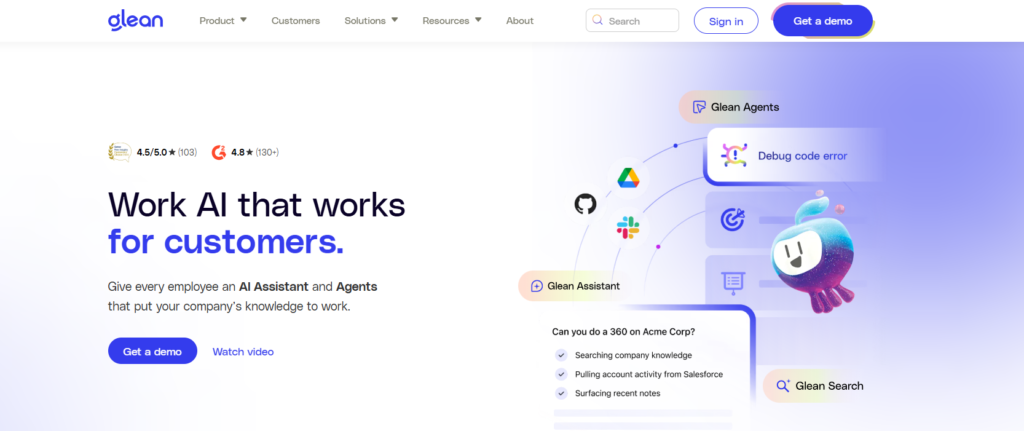
Glean is an AI-powered enterprise search and knowledge discovery platform. It helps employees search across workplace apps from one place. Instead of manually checking multiple tools, users can simply ask a question in natural language and get accurate answers in seconds.
In 2026, workplace productivity tools are becoming smarter with AI. Companies want faster access to information, better collaboration, and improved knowledge management. Glean helps solve these problems with semantic search, generative AI, and personalized search results.
This platform is useful for startups, remote teams, HR departments, IT teams, researchers, and large enterprises that handle large amounts of company data every day.
What is Glean?
Glean is an enterprise AI search platform designed to help organizations find and organize information across different business tools. It connects with workplace apps and creates a centralized search experience for employees.
The main goal of Glean is to reduce the time people spend searching for files, conversations, documents, and internal knowledge. Many businesses lose productivity because employees cannot quickly find the information they need. Glean solves this issue by using AI-powered semantic search.
Unlike traditional search engines, Glean understands context and company language. For example, if a company uses special project names or internal terms, Glean learns and recognizes them over time.
The platform also provides personalized results based on the user’s role, team, and permissions. This means employees only see information they are allowed to access. Glean is more than a search engine. It acts like a workplace knowledge assistant that helps teams work smarter and faster.
How Does Glean Work?
Core Technology Behind Glean
Glean uses advanced AI technologies such as vector search, machine learning, deep learning-based Large Language Models (LLMs), and knowledge graph systems.
Vector search helps Glean understand the meaning behind words instead of only matching exact keywords. This allows users to search naturally. For example, a user can type:
- “Latest HR policy”
- “Marketing campaign budget”
- “Customer onboarding guide”
Glean understands the intent behind these searches and provides relevant results. The platform continuously trains on company data and workplace language. This improves search accuracy over time.
How It Processes User Input
When a user enters a query, Glean scans connected apps and databases. It analyzes:
- Keywords
- Context
- User permissions
- Team activity
- Related documents
The AI system then ranks the most useful results for that user. Glean also uses a knowledge graph to understand relationships between people, projects, files, and conversations.
How It Generates Output
Glean delivers personalized search results, summaries, and AI-generated answers. Users can quickly open documents, view related conversations, or get instant insights from company data. Its generative AI assistant can summarize meetings, answer questions, and provide quick explanations from internal resources.
What Can You Do with Glean?
Glean offers many practical features for modern workplaces. It is designed to improve knowledge discovery and reduce wasted time. Here are some common things users can do with Glean:
- Search across multiple workplace apps from one dashboard
- Find documents, messages, presentations, and spreadsheets
- Get AI-generated summaries from meetings and documents
- Discover company knowledge quickly
- Access personalized search results
- Find experts or team members inside the organization
- Retrieve technical documentation
- Organize company information
For example, an HR manager can quickly find onboarding documents and employee policies. A developer can search for API documentation stored across different platforms. A marketing team can locate campaign reports without opening multiple tools.
Glean is especially useful for remote teams because information is often spread across many applications. The platform reduces confusion and helps employees work more efficiently by centralizing workplace knowledge.
How Are People Using Glean?
Many industries now use Glean to improve productivity and collaboration. Large enterprises use Glean to manage massive amounts of internal information. Employees can quickly locate reports, presentations, or conversations without wasting time.
Startups use Glean to organize growing company knowledge. As teams expand, information becomes harder to manage. Glean helps new employees quickly learn company processes. HR departments use Glean for:
- Employee document management
- Company policy access
- Onboarding support
- Internal communication searches
IT teams use it to access:
- Technical guides
- Support documentation
- System updates
- Internal troubleshooting resources
Business analysts use Glean to collect data and insights from multiple workplace tools. Marketing teams use it for campaign research, performance tracking, and competitor analysis.
For example, a remote software company may store files in Google Drive, communicate in Slack, and manage tasks in Jira. Glean connects all these systems into one searchable workspace.
How to Use Glean?
Step-by-Step Guide
Using Glean is relatively simple for most organizations.
- Create a company account
- Connect workplace apps and tools
- Allow data indexing and permissions
- Start searching using natural language
- Use filters and AI suggestions for better results
After setup, employees can access company knowledge through a single search interface.
Tips for Beginners
- Use clear search phrases
- Search naturally instead of using exact keywords
- Save commonly used searches
- Explore AI-generated summaries
- Connect as many workplace apps as possible
Common Mistakes to Avoid
- Ignoring permission settings
- Uploading outdated documents
- Using poor-quality internal documentation
- Not organizing company data properly
Since Glean depends on data quality, companies should maintain clean and updated information systems.
How to Access Glean?
Glean is mainly available as a web-based enterprise platform. Users can access it through browsers on desktops and laptops. The platform supports integration with more than 100 workplace applications, including:
- Slack
- Google Workspace
- Microsoft 365
- Jira
- Salesforce
- Notion
- Confluence
- Dropbox
Businesses usually deploy Glean across teams and departments. Some organizations also use APIs and enterprise integrations for custom workflows and automation.
Because Glean is cloud-based, remote teams can easily access workplace information from different locations. The platform focuses heavily on enterprise security and permission-aware access. Employees only see data they are authorized to view.
Key Features of Glean
Glean includes several advanced features that make workplace search smarter and more efficient.
Vector Search with AI
Glean understands the meaning behind user searches instead of relying only on keywords.
Generative AI Assistant
The AI assistant provides summaries, answers, and insights from company documents and conversations.
Personalized Search Results
Results are customized based on:
- User role
- Team
- Projects
- Permissions
Knowledge Graph Technology
Glean maps relationships between people, content, and workflows.
Continuous AI Learning
The platform learns company-specific language and improves accuracy over time.
Strong Security Controls
Permission-aware search ensures private information stays protected.
Easy Integrations
Glean connects with over 100 workplace tools and enterprise platforms.
Fast Setup Process
Many companies can deploy Glean without complex technical setup.
Glean Pricing
Free Plan
Glean does not currently offer a free public plan. Businesses usually need to contact the company for pricing details.
Paid Plans
Pricing is customized based on:
- Company size
- Number of users
- Required integrations
- Enterprise features
Large organizations may receive tailored enterprise packages.
Is It Worth It?
For businesses handling large amounts of data, Glean can save significant time and improve productivity. The platform may seem expensive for small teams, but larger organizations often benefit from:
- Faster information access
- Better collaboration
- Reduced knowledge loss
- Improved employee efficiency
For companies using many workplace tools, Glean can become a valuable long-term investment.
Rating Summary
- Ease of Use: 4.2/5
- Features: 4.7/5
- Performance: 4.3/5
- Security: 4.8/5
- Integrations: 4.6/5
- Pricing: 4.0/5
- Overall Score: 4.4/5
Glean performs especially well in enterprise search, personalization, and workplace integrations.
Benefits of Glean
Glean offers several practical advantages for businesses.
Improved Productivity
Employees spend less time searching for information.
Better Knowledge Sharing
Teams can quickly discover company resources and expertise.
Centralized Search Experience
Users can search across many apps from one place.
Personalized Results
Employees receive more relevant search results.
Strong Data Security
Permission-aware access protects private company information.
Reduced Information Silos
Glean helps unify scattered workplace knowledge.
Faster Employee Onboarding
New hires can quickly find training materials and company resources.
Limitations of Glean
Although Glean is powerful, it also has some limitations.
No Free Plan
Small businesses may find the pricing difficult.
Learning Curve
New users may need time to understand advanced features.
Data Dependency
Search quality depends heavily on company documentation quality.
Enterprise Focus
Smaller teams may not need all features.
Setup Complexity for Large Organizations
Connecting many systems may require planning and IT support. Despite these drawbacks, many enterprises still find Glean highly valuable.
How Accurate is Glean?
Glean is known for strong search accuracy because it uses semantic AI search instead of simple keyword matching. Its vector search technology helps the system understand context and user intent. This improves result quality significantly. The platform also learns from:
- Company language
- User interactions
- Internal workflows
- Search behavior
Because of this, search accuracy improves over time. However, performance still depends on how organized company data is. Businesses with outdated or messy documentation may experience weaker results. Overall, Glean performs very well for enterprise knowledge discovery and workplace search.
Best Alternatives to Glean
Several AI-powered search and research tools compete with Glean in 2026.
- GPTGO combines AI chatbot features with web search functionality. It is useful for users who want conversational search experiences.
- Andi offers AI-powered search with a clean and simple interface. It focuses on fast answers and easy browsing.
- Browse AI specializes in web automation and data extraction. Businesses use it for scraping and monitoring online information.
- Microsoft Bing includes AI-powered search with Copilot integration. It is useful for general web searches and AI-assisted productivity tasks.
Compared to these tools, Glean focuses more on enterprise workplace knowledge and internal business search systems.
Latest Updates
In 2026, enterprise AI tools are becoming more advanced and personalized. Glean continues improving its AI assistant and workplace integrations. Recent trends include:
- Better generative AI summaries
- Smarter semantic search
- Improved collaboration features
- Enhanced enterprise security
- More automation capabilities
Businesses are also adopting AI knowledge assistants to reduce manual work and improve decision-making. Glean remains one of the leading platforms in AI-powered workplace search and enterprise knowledge management.
FAQs
Is Glean free?
No. Glean currently does not offer a free public plan. Businesses need to contact the company for custom pricing.
Is it safe to use?
Yes. Glean focuses heavily on enterprise security, privacy, and permission-aware access controls.
Who should use it?
Glean is ideal for:
- Enterprises
- Startups
- HR teams
- IT departments
- Researchers
- Remote teams
What makes it different?
Glean stands out because it understands company-specific language and provides personalized AI-powered workplace search across multiple apps.
Conclusion
Glean is one of the most advanced enterprise search and knowledge discovery platforms available in 2026. It helps businesses organize information, improve collaboration, and reduce time wasted searching across workplace tools.
Its AI-powered semantic search, personalized results, and strong security features make it highly valuable for modern organizations. While it may not be ideal for very small teams, larger companies can gain major productivity benefits from using Glean.
As workplaces continue adopting AI-driven systems, tools like Glean will play a major role in helping teams access information faster and work more efficiently.
Glean Reviews
No reviews yet. Be the first to comment!
Best Glean Alternatives AI
What is Paperpal? How It Works, Use Cases & Alternatives In 2026,…
What is Unreal Speech? How It Works, Use Cases & Alternatives In…
What is Keyword Discovery? How It Works, Use Cases & Alternatives Keyword…
What is TrendSpider? How It Works, Use Cases & Alternatives TrendSpider is…

What is PDF.ai? How It Works, Use Cases & Alternatives Managing PDF…

What is Block Survey? How It Works, Use Cases & Alternatives In…

What is Casetext? How It Works, Use Cases & Alternatives Casetext is…

What is Datature? How It Works, Use Cases & Alternatives Datature is…
Leave a Reply