

 Verified

What is Paperpal? How It Works, Use Cases & Alternatives In 2026, academic writing has become more demanding than ever. […]
AI Categories: Education, Research, Writing Generators,
AI Tags: #education #research #writing generators
What is Paperpal? How It Works, Use Cases & Alternatives
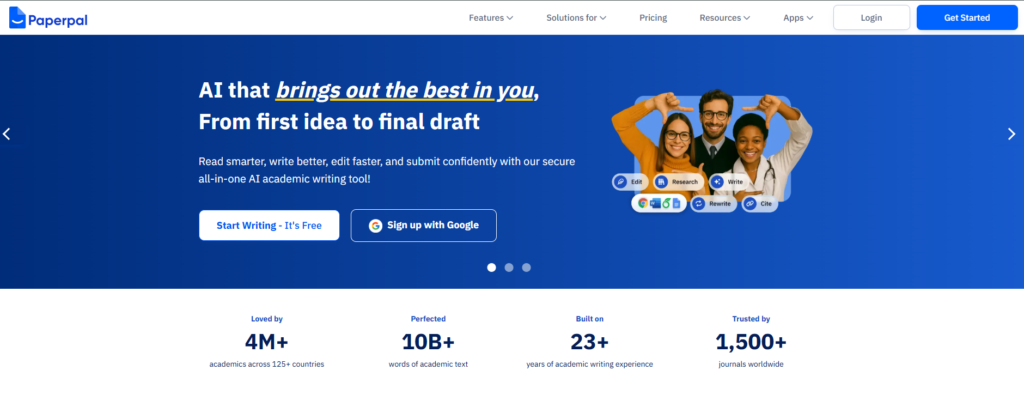
In 2026, academic writing has become more demanding than ever. Students and researchers must produce high-quality papers, often under strict deadlines. This is where Paperpal becomes useful. It is an AI-powered writing assistant built specifically for academic work.
Unlike general writing tools, Paperpal focuses on research-based writing and formal academic style. Paperpal helps users improve grammar, clarity, and structure in real time. It also checks plagiarism and supports research-based writing. This makes it valuable for students, PhD scholars, and journal authors.
In today’s fast academic world, accuracy and speed matter. Paperpal helps reduce editing time and improves writing quality. Anyone who writes essays, research papers, or theses can benefit from it.
What is Paperpal?
Paperpal is an AI-driven academic writing assistant designed to improve scholarly writing. It helps users write clearer, more accurate, and publication-ready content.
The main problem it solves is poor academic writing quality. Many writers struggle with grammar, tone, and research accuracy. Paperpal fixes these issues by offering real-time suggestions and academic-style corrections.
Its key purpose is to support writing from the first draft to final submission. It ensures that content is not only correct but also suitable for academic standards. It is widely used in education and research fields because it understands scientific writing better than general AI tools.
How Does Paperpal Work?
Core Technology Behind Paperpal
Paperpal uses advanced AI language models trained on academic content. It understands research writing patterns, grammar rules, and citation styles. This helps it give accurate suggestions based on academic standards.
How It Processes User Input
When a user writes text, Paperpal scans it in real time. It checks grammar, sentence structure, tone, and clarity. It also compares text with academic databases to detect similarity issues.
How It Generates Output
After analysis, Paperpal provides suggestions instantly. It may correct grammar, improve sentence flow, or suggest better academic wording. It also gives plagiarism reports and research-backed recommendations. The output is designed to be clean, formal, and publication-ready.
What Can You Do with Paperpal?
With Paperpal, users can do much more than basic writing correction. You can:
- Write academic essays with proper structure
- Improve research paper clarity
- Generate formal emails for journals
- Check plagiarism before submission
- Get suggestions for better academic vocabulary
For example, a student writing a thesis can use Paperpal to fix grammar issues and improve clarity. A researcher can use it to refine a journal article before submission. It acts like a smart editor that works instantly while you write.
How Are People Using Paperpal?
People use Paperpal across education and research fields.
Students use it for essays, assignments, and dissertations. It helps them avoid grammar mistakes and improve academic tone. Researchers use it to prepare journal papers and conference articles.
Universities also encourage its use for improving student writing quality. Non-native English speakers benefit the most because it improves language fluency. Editors use it to speed up proofreading tasks.
For example, a PhD student writing a medical research paper can use Paperpal to ensure correct terminology and formatting before submission.
How to Use Paperpal?
Step-by-Step Guide
- Sign up on the Paperpal platform
- Open the writing editor or MS Word plugin
- Paste or write your content
- Review real-time suggestions
- Apply grammar and style improvements
- Run plagiarism and readiness checks
Tips for Beginners
- Start with short documents first
- Accept suggestions carefully, don’t auto-apply everything
- Use plagiarism checker before final submission
- Combine Paperpal with your own editing
Common Mistakes to Avoid
- Relying fully on AI without review
- Ignoring context-based suggestions
- Skipping final proofreading step
How to Access Paperpal?
Paperpal is available through multiple platforms.
You can use it on:
- Web browser editor
- MS Word plugin
- Online academic writing interface
It is cloud-based, so you only need an internet connection. No heavy installation is required. This makes it easy for students and researchers to access it from anywhere.
Key Features of Paperpal
Paperpal offers several strong features designed for academic writing:
- Real-time language suggestions for grammar and tone
- Plagiarism checker with side-by-side comparison
- Access to 250+ million research articles
- AI writing assistant for drafting and editing
- Pre-submission readiness checks with 30+ evaluations
Each feature is designed to improve academic writing quality. For example, the research feature helps users find supporting studies directly while writing.
Paperpal Pricing
Free Plan
The free version of Paperpal includes basic writing help. Users can access limited suggestions and simple editing tools. It is good for casual writing and small assignments.
Paid Plans
Paperpal Prime is the premium plan. It includes unlimited plagiarism checks, advanced grammar corrections, and full research support features.
Is Paperpal Worth It?
For serious students and researchers, the paid version is worth it. It saves time, improves quality, and reduces rejection chances in academic publishing.
Rating Summary
- Ease of Use: 4.2/5
- Features: 4.8/5
- Pricing: 4.0/5
- Accuracy: 4.5/5
- Overall: 4.5/5
Paperpal is easy to use after basic learning. It performs strongly in academic writing tasks and offers reliable suggestions for researchers and students.
Benefits of Paperpal
Paperpal offers many practical advantages:
- Speeds up academic writing process
- Improves grammar and sentence clarity
- Helps avoid plagiarism issues
- Supports research-based writing
- Useful for non-native English speakers
- Reduces editing and proofreading time
For example, a student can finish a research paper faster because Paperpal handles most language corrections in real time.
Limitations of Paperpal
Even though Paperpal is powerful, it has some drawbacks:
- New users may need time to learn it
- Works mainly on web and MS Word only
- Full features require paid subscription
- Limited offline functionality
It is not a complete replacement for human editing. Users still need to review suggestions carefully.
How Accurate is Paperpal?
Paperpal is highly accurate for academic writing tasks. It is trained on scholarly content, so it understands formal writing better than general AI tools. Its grammar suggestions are reliable and context-aware. The plagiarism detection system is also strong and helps maintain originality.
However, like all AI tools, it is not perfect. Users should still manually check final drafts before submission. Overall, it performs well for students and researchers who need consistent writing quality.
Best Alternatives to Paperpal
If you want other options similar to Paperpal, here are some alternatives:
- Writesonic – Good for general AI writing, marketing content, and blog creation. It is more versatile but less academic-focused.
- Copy.ai – Best for short-form content like emails and social posts. It is simple but not specialized for research writing.
- Jetwriter AI – Focuses on fast content generation. Useful for quick drafts but lacks deep academic features.
- Jasper – A powerful AI writing tool for professional content. It is strong in marketing and business writing but not research-heavy.
Compared to these tools, Paperpal is more focused on academic writing and research accuracy.
Latest Updates
In 2026, Paperpal continues to improve its AI accuracy and research integration. It now offers faster real-time suggestions and better plagiarism detection. The platform is also expanding its research database access. This helps users find more reliable academic sources while writing. Another trend is better integration with writing tools like MS Word, making it easier for researchers to work without switching platforms.
FAQs
Is Paperpal free?
Yes, Paperpal offers a free plan with basic writing and editing features. However, advanced tools require a paid subscription.
Is it safe to use?
Yes, Paperpal is safe. It follows data privacy rules and keeps user documents secure.
Who should use Paperpal?
Students, researchers, academics, and editors should use Paperpal. It is especially helpful for academic writing.
What makes it different?
Paperpal is different because it focuses only on academic writing. It also includes research support and plagiarism checking in one platform.
Final Thoughts
Paperpal is a strong AI tool for academic writing in 2026. It helps users write better, faster, and more accurately. With features like real-time suggestions, plagiarism checking, and research support, it stands out in the education and research space.
While it has some limitations, its benefits make it highly valuable for students and researchers. If you want to improve academic writing quality, Paperpal is one of the most reliable tools available today.
Paperpal Reviews
No reviews yet. Be the first to comment!
Best Paperpal Alternatives AI

What is BrandWell? How It Works, Use Cases & Alternatives In 2026,…

What is Unreal Speech? How It Works, Use Cases & Alternatives In…
What is Keyword Discovery? How It Works, Use Cases & Alternatives Keyword…

What is Glean? How It Works, Use Cases & Alternatives Businesses now…

What is TrendSpider? How It Works, Use Cases & Alternatives TrendSpider is…

What is PDF.ai? How It Works, Use Cases & Alternatives Managing PDF…

What is Block Survey? How It Works, Use Cases & Alternatives In…

What is Casetext? How It Works, Use Cases & Alternatives Casetext is…
Leave a Reply