

 Verified

What is Casper AI? How It Works, Use Cases & Alternatives In today’s digital world, people are overloaded with information. […]
AI Categories: Personal Assistant, Research, Summarizer,
AI Tags: #personal assistant #research #summarizer
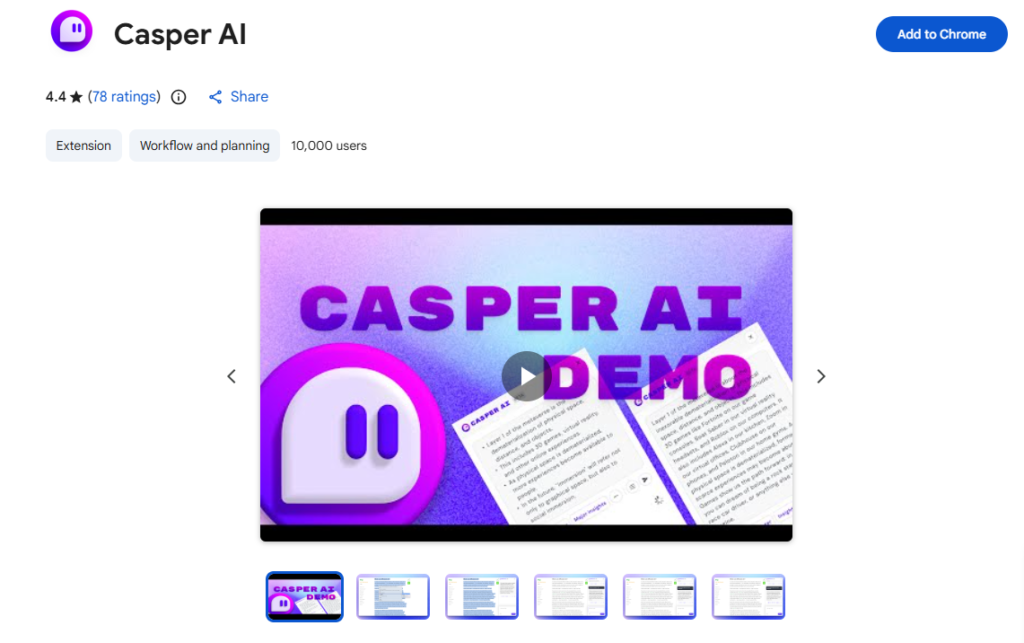
What is Casper AI? How It Works, Use Cases & Alternatives
In today’s digital world, people are overloaded with information. Reading long articles, research papers, and reports takes a lot of time. This is where Casper AI becomes useful. It helps users quickly understand complex content by turning long text into short, clear summaries.
Casper AI is especially helpful in 2026, when professionals need fast insights to stay competitive. Instead of reading everything manually, users can get key points in seconds. This saves time and improves decision-making.
It is mainly used by analysts, business developers, policymakers, researchers, and students. Anyone who deals with large amounts of information can benefit from it. Casper AI works as a smart assistant that simplifies learning and research.
What is Casper AI?
Casper AI is a Chrome extension designed to summarize web pages, articles, PDFs, and online documents using artificial intelligence. It removes unnecessary details and keeps only the most important information.
The main problem it solves is information overload. People often struggle to read everything they find online. Casper AI solves this by extracting key insights quickly and clearly.
Its core purpose is to help users save time, understand content faster, and improve productivity. Instead of reading long materials, users can focus on decision-making and action.
How Does Casper AI Work?
Core Technology Behind Casper AI
Casper AI uses advanced AI models and natural language processing (NLP). These technologies allow it to understand text like a human and identify important points.
It scans documents, analyzes meaning, and removes unnecessary words. Then it reorganizes the content into short summaries.
How It Processes User Input
When a user opens a web page or PDF and activates Casper AI, it:
- Reads the full content
- Identifies key ideas and arguments
- Filters out extra or repetitive information
- Breaks down information into simple points
How It Generates Output
After processing, Casper AI produces:
- Short summaries
- Key highlights
- Actionable insights
For example, a 2000-word article can be reduced into a few clear bullet points in seconds.
What Can You Do with Casper AI?
With Casper AI, users can perform several useful tasks:
- Summarize long research papers in seconds
- Understand news articles quickly
- Extract key points from PDF reports
- Analyze market trends without reading full reports
- Prepare study notes faster
For example, a business analyst reading a 50-page industry report can use Casper AI to instantly get the main findings. This helps save hours of manual reading.
How Are People Using Casper AI?
Different professionals use Casper AI in different ways:
- Analysts: Summarize data reports and financial insights
- Business Developers: Track market trends and competitors
- Policymakers: Understand laws and regulations quickly
- Students: Prepare exam notes from long textbooks
- Researchers: Review academic papers efficiently
- Legal professionals: Summarize case laws and documents
It is also used in uncommon ways like summarizing email threads or organizing online research for projects.
How to Use Casper AI?
Step-by-Step Guide
Using Casper AI is very simple:
- Install the Casper AI Chrome extension
- Open any article, PDF, or web page
- Click on the Casper AI icon
- Wait a few seconds for processing
- Read the generated summary
Tips for Beginners
- Start with short articles first
- Use it for research or study materials
- Compare original text with summaries to learn better
- Focus on key points, not full summaries
Common Mistakes to Avoid
- Don’t rely only on summaries for critical decisions
- Avoid using it on very short content
- Don’t ignore original sources completely
How to Access Casper AI?
Casper AI is mainly available as a Chrome extension.
It can be used on:
- Desktop browsers (Google Chrome)
- Web-based workflows
- Some integrated productivity tools
It does not fully support offline use since it relies on web content processing. Most users access it through their browser while reading online content.
Key Features of Casper AI
Here are the main features of Casper AI:
- AI-powered summarization of articles and PDFs
- Chrome extension integration for easy access
- Ability to process long documents quickly
- Data collection from public sources
- Personalized insight generation
- Clean and simple user interface
- Fast processing speed for real-time use
These features make it a strong productivity tool for knowledge workers.
Casper AI Pricing
Free Plan
Casper AI offers a free tier with limited usage. Users can try basic summarization features without payment.
Paid Plans
Paid versions may include:
- More advanced summarization limits
- Faster processing
- Better integrations
- Additional AI features
Is It Worth It?
For professionals who deal with large amounts of reading daily, Casper AI is worth it. It saves time and increases productivity, which is more valuable than the cost for many users.
Rating Summary
- Ease of Use: 4.5/5
- Features: 4.6/5
- Pricing: 4.0/5
- Performance: 4.4/5
- Overall: 4.4/5
Benefits of Casper AI
Casper AI offers several practical advantages:
- Saves time by summarizing long content
- Improves productivity in research and work
- Helps users understand complex topics easily
- Reduces reading fatigue
- Supports faster decision-making
It is especially helpful for people working under tight deadlines.
Limitations of Casper AI
Even though Casper AI is powerful, it has some drawbacks:
- Requires learning time for new users
- Limited offline functionality
- Not compatible with all third-party tools
- Depends on browser usage
These limitations may affect advanced users who need full flexibility.
How Accurate is Casper AI?
Casper AI is generally accurate in summarizing content. It performs well with structured articles, reports, and research papers.
However, like most AI tools, it may sometimes miss context or subtle meanings. That’s why users should always review original content when making important decisions. Overall, it is reliable for quick understanding and productivity tasks.
Best Alternatives to Casper AI
If you want other options similar to Casper AI, here are the best alternatives:
- Writesonic – Strong for AI writing and content creation
- Perplexity – Great for AI-powered search and research
- Merlin – Chrome extension for summarizing and writing
- Quillbot – Excellent for paraphrasing and rewriting text
- timeOS – AI productivity assistant for meetings and notes
Each tool has its strengths, but Casper AI is best for fast summarization inside the browser.
Latest Updates (2026)
In 2026, tools like Casper AI are becoming more advanced. The trend is shifting toward:
- Faster real-time summarization
- Better integration with workflows
- More personalized AI insights
- Smarter understanding of context
Casper AI continues improving its ability to process large documents more accurately and quickly.
FAQs
Is Casper AI free?
Yes, Casper AI offers a free plan with limited features.
Is it safe to use?
Yes, it is generally safe as it works as a browser extension and processes public content.
Who should use it?
It is best for students, researchers, analysts, and professionals who deal with large amounts of information.
What makes it different?
Its ability to quickly summarize web pages and PDFs directly inside the browser makes it highly convenient and time-saving.
Final Thoughts
Casper AI is a powerful productivity tool that helps users save time and understand information faster. In a world full of content overload, it acts as a smart assistant that simplifies reading and research
Casper AI Reviews
No reviews yet. Be the first to comment!
Best Casper AI Alternatives AI
What is Keyword Discovery? How It Works, Use Cases & Alternatives Keyword…
What is Glean? How It Works, Use Cases & Alternatives Businesses now…

What is TrendSpider? How It Works, Use Cases & Alternatives TrendSpider is…

What is PDF.ai? How It Works, Use Cases & Alternatives Managing PDF…

What is Block Survey? How It Works, Use Cases & Alternatives In…

What is Casetext? How It Works, Use Cases & Alternatives Casetext is…

What is Datature? How It Works, Use Cases & Alternatives Datature is…

What is SchoolAI? How It Works, Use Cases & Alternatives SchoolAI is…
Leave a Reply